Privacy: redaction & zero-knowledge
mcppipe records each JSON-RPC call so the Inspector
can show you what your agents did. This guide covers the three knobs that decide
how much of a request is stored, from masking a single argument to a
zero-knowledge mode where mcppipe never parses your traffic at all.
One distinction runs through everything below: the recorded copy is not the
upstream wire. Privacy mode and redaction rules only ever touch the
jsonrpc_events row the Inspector renders. Your MCP server always receives the
real, unmodified request. Zero-knowledge mode is the exception that also stops
mcppipe from reading the bytes in the first place.
All three controls live on the Settings tab of a tunnel (the four tabs are Live, Inspector, Tools, and Settings — see the dashboard reference). They are available on every plan.
Privacy mode (redact all payloads)
Section titled “Privacy mode (redact all payloads)”The simplest control is an all-or-nothing toggle. In the Privacy section of Settings, turn on Redact request payloads. It saves immediately — no Save button — and applies to new requests from that point on.
With privacy mode on, mcppipe stores a placeholder instead of the body:
{ "_redacted": true, "_note": "request payload not stored (tunnel privacy mode is on)"}The Inspector keeps the method, tool name, status, latency, and session — just not the argument contents. Existing recorded events are not rewritten; only new events are redacted.
Field-level redaction rules
Section titled “Field-level redaction rules”When you want the Inspector to stay useful but need to keep a specific secret out of storage, use Redaction rules. Each rule masks or drops individual fields of a tool’s arguments or response in the recorded payload only — the forwarded request is untouched, so your upstream still gets the real value.
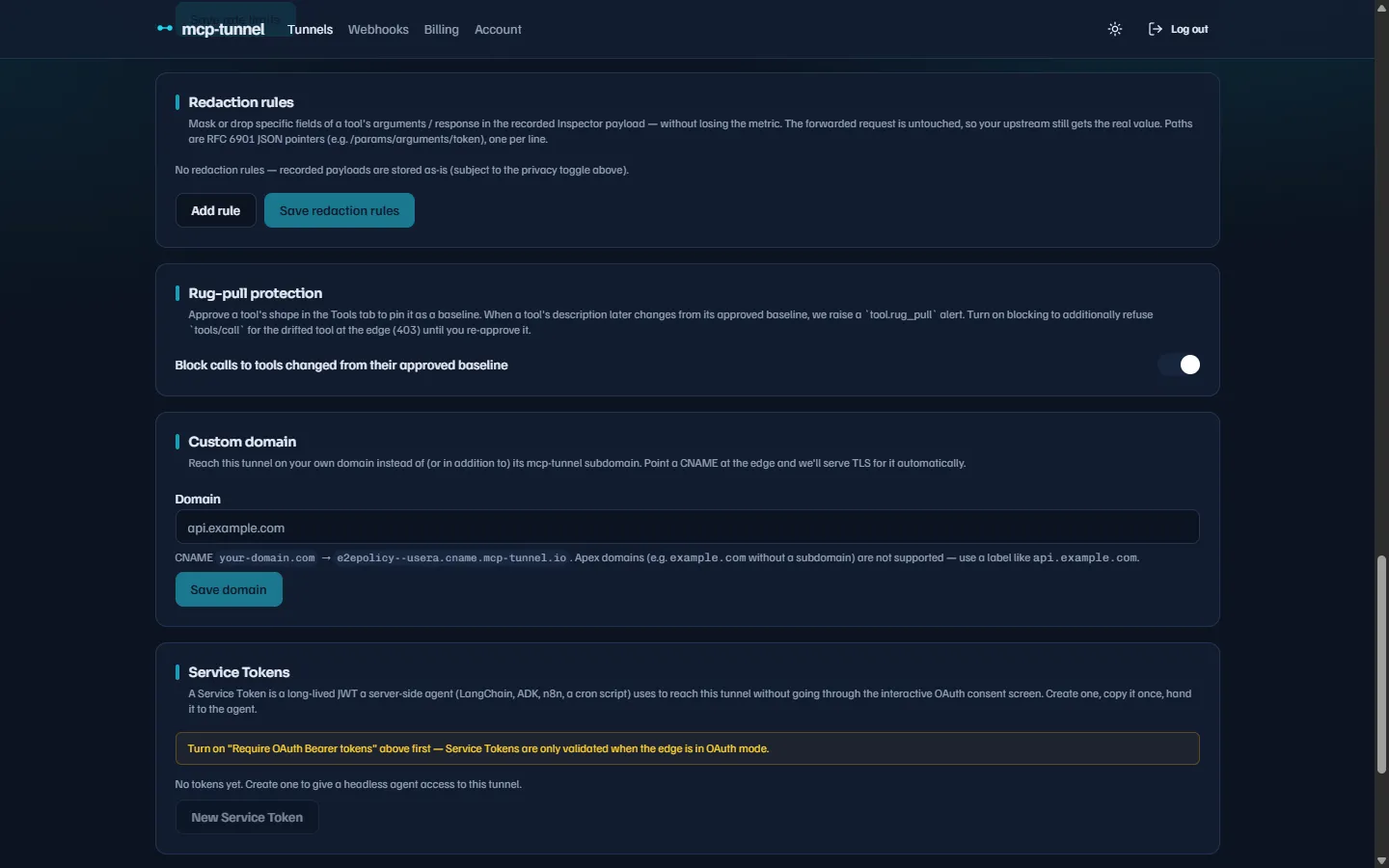 Each rule targets a tool (or
 *), a mode (mask or drop), and one JSON pointer per line.
Each rule has four parts:
- Tool (or
*) — the MCP tool name this rule matches. Use*to match every tool, including the payloads of non-tools/callmethods. - Mode —
maskreplaces the value with the string***(the field stays present, so its shape is preserved);dropremoves the key or array element entirely. - Request paths — RFC 6901 JSON pointers into the request object whose
values are redacted, one per line (e.g.
/params/arguments/token). - Response paths — JSON pointers into the response, applied when a recorded
response is rendered, e.g. on Inspector replay
(e.g.
/result/content/0/text).
Click Add rule, fill it in, then Save redaction rules.
Pointer rules and limits
Section titled “Pointer rules and limits”Pointers are resolved against the full JSON-RPC object, so a tools/call
argument lives at /params/arguments/<name>. Validation enforces:
- Each pointer must be non-empty and start with
/. The empty pointer (which would target the whole document) is refused on save and ignored by mcppipe — a rule can never blank an entire payload by accident. - A rule needs at least one request or response path.
- Up to 32 rules per tunnel, and up to 32 paths per rule.
- A pointer that doesn’t resolve (the field is absent) simply redacts nothing — no error.
For example, a rule for tool send_email with mode mask and request path
/params/arguments/api_key turns this recorded request:
{ "params": { "name": "send_email", "arguments": { "to": "a@b.com", "api_key": "sk-live-123" } } }into:
{ "params": { "name": "send_email", "arguments": { "to": "a@b.com", "api_key": "***" } } }while the upstream still receives sk-live-123 verbatim.
Zero-knowledge mode
Section titled “Zero-knowledge mode”Privacy mode and redaction rules still let mcppipe read your traffic to record metadata. Zero-knowledge mode goes further: mcppipe terminates TLS and relays the raw bytes to your server without ever parsing the JSON-RPC.
In the Capture mode (privacy) section, turn on Zero-knowledge (edge never reads traffic). The default mode is Observability, where mcppipe parses your JSON-RPC to power the Inspector, tool policy, and rate limits.
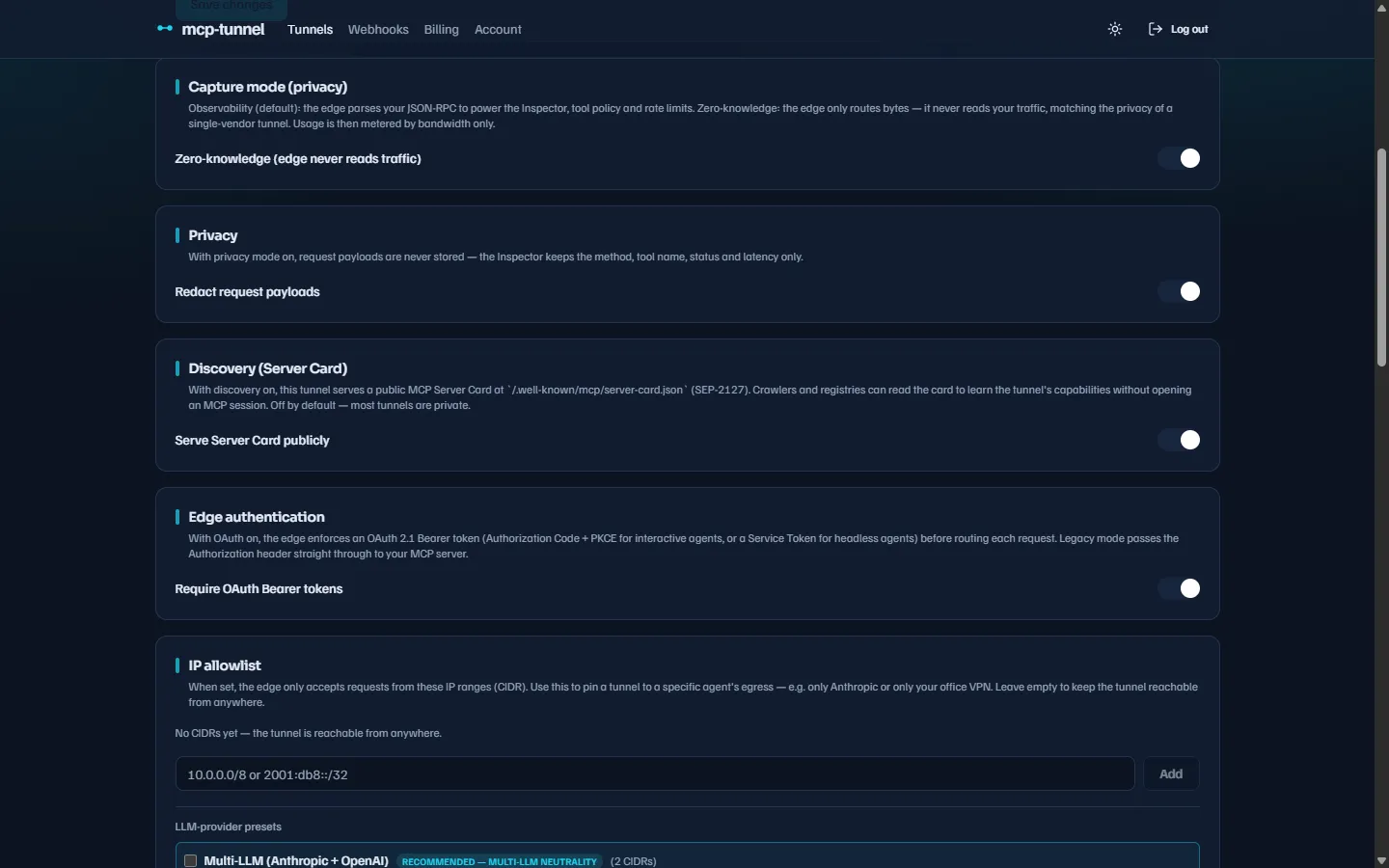 Zero-knowledge matches the privacy of a single-vendor tunnel — mcppipe only routes bytes.
When zero-knowledge is on, for that tunnel mcppipe does not:
- parse the request body,
- record a
jsonrpc_eventsrow (no Inspector, no Live tail), - apply the tool policy or per-method/per-tool rate limits,
- evaluate redaction rules (there is no recorded payload to redact),
- run tool-pin / rug-pull checks.
Because mcppipe can’t count tool calls without parsing, usage is metered by bandwidth only — bytes in and out still flow to your plan’s transfer quota. Zero-knowledge is available on every tier.
A zero-knowledge request runs no content inspection — no tool policy, rate limits, or redaction — and records no traffic event.
Which control to use
Section titled “Which control to use”| Goal | Use |
|---|---|
| Keep metadata, drop all argument contents | Privacy mode (redact all payloads) |
| Keep most of the payload, hide a few fields | Field-level redaction rules |
| mcppipe must never read your traffic at all | Zero-knowledge mode |
All three are per-tunnel and can be changed at any time from Settings; changes apply to new requests. Redaction never alters what your upstream MCP server receives — only zero-knowledge changes what mcppipe itself sees.
Related
Section titled “Related”- Live traffic & Inspector — what the recorded payloads power.
- Tool governance — allow/deny policy, rate limits, and pinning (all inactive under zero-knowledge).
- IP allowlist & access control and Authentication — gates that still apply in zero-knowledge mode.
- Billing & plans — how bandwidth and tool-call usage are metered.