IP allowlist & access control
An IP allowlist locks a tunnel down to a set of client IP ranges. When the
list is non-empty, mcppipe only forwards requests whose resolved client IP
falls inside one of your CIDRs; everything else gets a 403 before it ever
reaches your upstream. Use it to pin a tunnel to a known agent’s egress range,
to your office VPN, or to a CI runner.
It is a per-tunnel control, configured under the Settings tab of a tunnel (one of the four tabs: Live, Inspector, Tools, Settings). It works on every plan and composes with the other gates — see OAuth & Service Tokens for token-based auth and Tool governance for policy and rate limits.
How it fits in the request path
Section titled “How it fits in the request path”The allowlist is checked before authentication and before quota accounting. A blocked IP never consumes your OAuth token budget or your monthly quota counters, and a forged-header probe fails closed without ever reaching the token validator. mcppipe evaluates each request in this order:
- Suspended? A suspended tunnel returns
403and serves nothing. - Default subdomain disabled? (see Custom domains & TLS)
- IP allowlist — this page.
- OAuth (only when the tunnel’s auth mode is
oauth). - Plan quota.
An empty allowlist means no enforcement — the tunnel is reachable from anywhere, which is the default for a new tunnel.
Configure it in the dashboard
Section titled “Configure it in the dashboard”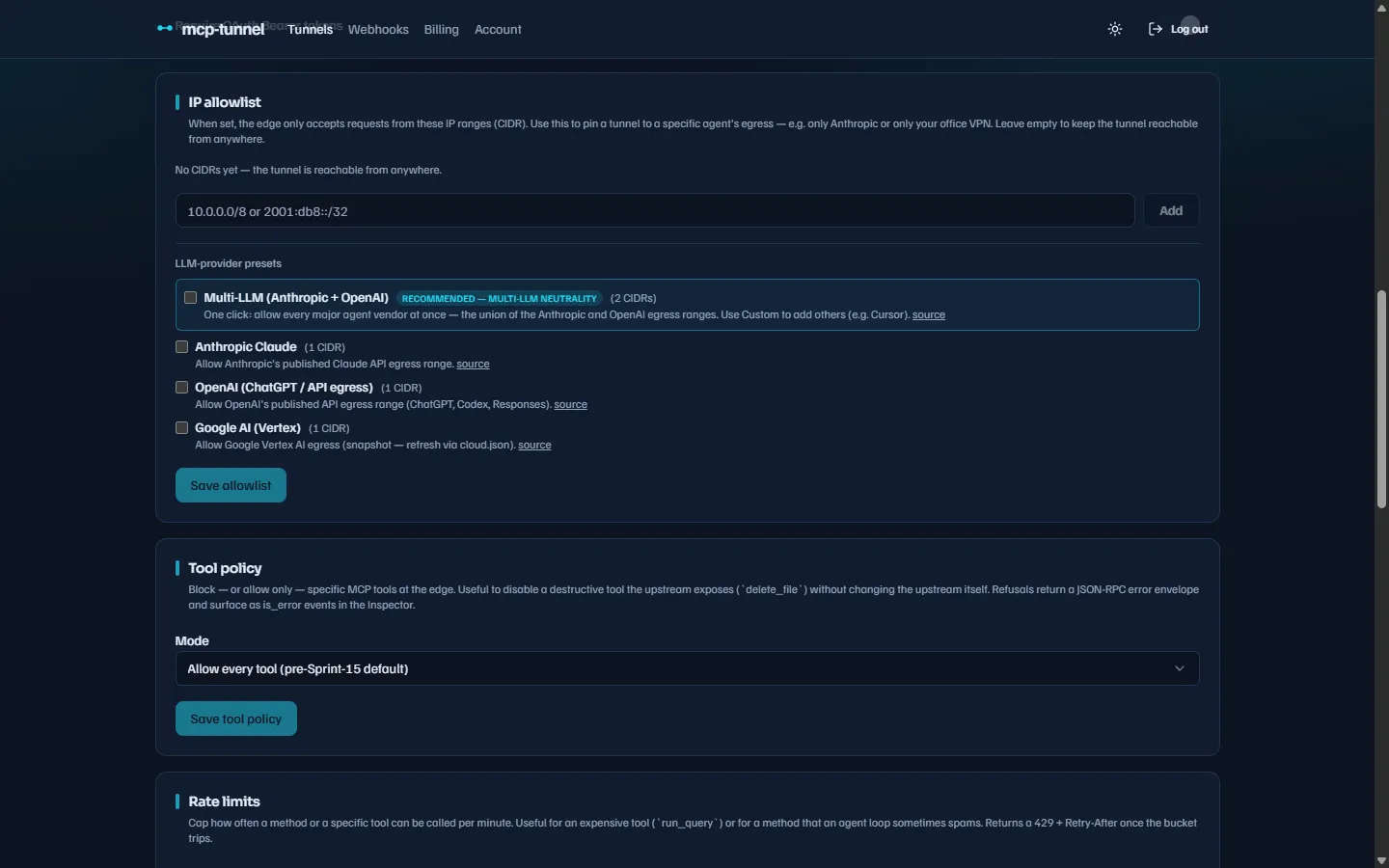 The IP allowlist section: free-form CIDR entries plus one-click LLM-provider presets.
Open the tunnel, go to Settings, and find the IP allowlist section. There are two ways to add ranges:
- Custom CIDR — type a range such as
203.0.113.0/24or10.0.0.0/8and press Add. A bare IP without a mask is rejected client-side with “CIDR mask is required — write1.2.3.4/32or similar”; write the explicit/32(or/128for IPv6). - Presets — checkboxes for known LLM-provider egress ranges (see below). Checking one merges its CIDRs into your list; unchecking removes them.
Click Save allowlist to apply. mcppipe validates and canonicalizes every
entry before persisting: host bits are zeroed (192.168.1.1/24 becomes
192.168.1.0/24), duplicates are dropped, and the list is capped at 32
entries. An invalid CIDR is rejected with a 400 and a toast; the bad value
stays in the input for editing. Saving an empty list clears enforcement and the
dashboard confirms “IP allowlist cleared — the tunnel is reachable from
anywhere.”
Both IPv4 and IPv6 CIDRs are supported. An IPv4 client arriving over mcppipe’s
dual-stack listener (as an IPv4-mapped IPv6 address) is normalized to its IPv4
form before matching, so a plain 0.0.0.0/0-style IPv4 rule always matches an
IPv4 client.
LLM-provider presets
Section titled “LLM-provider presets”The presets expand a vendor’s published egress ranges into your list with one click. They are a point-in-time snapshot baked into the product (not auto- refreshed), and each links to the provider’s source page so you can verify what you’re allowing:
| Preset | Covers |
|---|---|
| Multi-LLM (Anthropic + OpenAI) | The union of the Anthropic and OpenAI egress ranges — recommended, listed first |
| Anthropic Claude | Anthropic’s published Claude API egress range |
| OpenAI (ChatGPT / API egress) | OpenAI’s published egress (ChatGPT, Codex, Responses) |
| Google AI (Vertex) | Google Vertex AI egress (snapshot) |
The Multi-LLM preset is the one-click materialization of vendor neutrality:
allow every major agent vendor at once. It is exactly Anthropic ∪ OpenAI.
Client-IP resolution
Section titled “Client-IP resolution”The allowlist is matched against the resolved client IP of each request. As a
fully managed hosted service, mcppipe resolves the real client IP for you: it
accounts for its own edge proxies and load balancers and matches against the
originating client’s address, not an intermediary hop. X-Forwarded-For headers
arriving from untrusted networks are ignored, so a caller can only be matched on
an IP it cannot forge — there is nothing for you to configure here.
What a blocked request gets
Section titled “What a blocked request gets”A request whose client IP is not in the allowlist is refused with HTTP 403 and a JSON body:
{ "error": "ip_forbidden", "error_description": "your client IP is not in this tunnel's allowlist"}If the allowlist is enforced but mcppipe cannot determine the client’s IP at
all, the request is denied (fail-closed) with the description
"unknown client ip".
Gotchas
Section titled “Gotchas”- Empty list = open. Clearing the allowlist removes enforcement entirely; it does not “deny all”. To restrict access without a known IP range, use OAuth instead.
- Public host model. Your tunnel is reachable at
https://<subdomain>--<account-slug>.<zone>/mcp. The allowlist gates the client’s source IP, regardless of which host (default subdomain or custom domain) the request arrived on. - Canonicalization is automatic. Don’t worry about host bits — mcppipe
normalizes
1.2.3.4/24to1.2.3.0/24on save. - Max 32 entries. If you need broader coverage, use wider CIDRs or a preset.
Related
Section titled “Related”- Authentication: OAuth & Service Tokens — token-based access control
- Tool governance — allow/deny policy and rate limits
- Custom domains & TLS — bring your own FQDN
- Client compatibility — which agents reach a tunnel