Multi-upstream aggregation
A single tunnel can front more than one MCP server. The CLI runs an
MCP-native aggregator that fans every request out to the right backend and
presents all of them to the agent as one coherent server. Tools, prompts and
resources are namespaced by the upstream they came from, so two backends can
both expose a read_file tool without colliding.
Use this when you want one public URL — and one set of credentials, one IP allowlist, one auth policy — to cover a filesystem server, a database server, a search server, and so on.
How an upstream is exposed
Section titled “How an upstream is exposed”The aggregator prefixes every identifier with the upstream’s name:
- Tools and prompts become
<upstream>__<original>— for examplefilesystem__read_file. The separator is a double underscore (__), chosen because a single_is common inside MCP tool names. De-prefixing splits on the first__, so an original name that itself contains__is preserved verbatim in the tail. - Resource URIs are wrapped in their own scheme,
mcppipe://<upstream>/<base64url(original-uri)>. The rewritten URI is a valid URI the agent can round-trip back, so there is no side-table to keep in sync.
tools/list, prompts/list and resources/list are fanned out and merged;
tools/call, prompts/get and resources/read are routed back to the single
upstream named in the prefix. initialize is fanned out and the upstreams’
capabilities are merged, negotiating the lowest common protocol version.
Upstream names
Section titled “Upstream names”Upstream names follow the same shape rule as tunnel subdomains:
^[a-z][a-z0-9_-]{0,31}$ — lowercase ASCII, must start with a letter, up to
32 characters, hyphens and underscores allowed. The reserved separator __
may not appear in a name. Names must be unique within a tunnel; a duplicate is
rejected loudly (otherwise one upstream’s tools would silently shadow the
other’s).
Start an aggregator from flags
Section titled “Start an aggregator from flags”Pass --upstream or --stdio more than once, and give each one a name=
prefix. You can mix HTTP and stdio backends freely:
mcppipe up \ --upstream search=http://127.0.0.1:3001 \ --stdio filesystem="npx -y @modelcontextprotocol/server-filesystem ." \ --api-key <your-tunnel-api-key>Rules the CLI enforces:
- A single bare
--upstream <url>(or--stdio <cmd>) keeps the single-upstream hot path and needs no name. A single--upstreamand a single--stdiotogether is still rejected as ambiguous. - As soon as you pass two or more sources, every one must use
name=...syntax — a bare value with no name errors out. --upstreamand--stdiomay each be repeated and combined; the total set becomes the aggregator layout.
See the CLI reference for the full flag list, including
--metrics-addr (Prometheus counters for recoveries and fan-out).
Start an aggregator from a TOML file
Section titled “Start an aggregator from a TOML file”For larger layouts, keep the list in a file and pass --upstreams-file. It
conflicts with --upstream / --stdio — use one form or the other.
mcppipe up --upstreams-file ./tunnel.toml --api-key <your-tunnel-api-key># tunnel.toml — one [upstreams.<name>] section per backend.# Each section sets exactly one of `http` or `stdio`.
[upstreams.filesystem]stdio = "npx -y @modelcontextprotocol/server-filesystem ."
[upstreams.search]http = "http://127.0.0.1:3001"The section key is the upstream name (it must validate against the name rules
above). Setting both http and stdio — or neither — in a section is an
error, as is an empty file with no [upstreams.*] sections. A file with a
single upstream collapses to the single-upstream path automatically.
Auto-detected aggregation
Section titled “Auto-detected aggregation”If you run mcppipe up with no source flags, the CLI detects MCP servers
configured in your local clients. When several are found:
- In a terminal (TTY), it asks whether to expose one or aggregate several, then lets you multi-select which backends to include.
- Headless (CI, no TTY), it brings up all detected servers under the
aggregator and prints a warning so you can pin an explicit set with
--upstream name=urlif the auto-picked list is wrong.
Detected client keys are sanitized into valid upstream names automatically
(lowercased, illegal characters replaced, __ collapsed, prefixed with srv-
if they would otherwise start with a non-letter).
Per-upstream lifecycle
Section titled “Per-upstream lifecycle”Each upstream has an independent state machine, so one failing backend never takes down the others — calls to a degraded upstream fail fast while the rest keep serving. The four phases are:
| Phase | Meaning |
|---|---|
connecting | The first initialize hasn’t completed yet. |
available | Last call succeeded; the aggregator routes to it. |
recovering | A burst of errors tripped recovery; calls to this upstream short-circuit with a -32000 upstream_unavailable JSON-RPC error while a background loop retries with backoff. |
failed | Recovery was exhausted; auto-retry stops. A fresh initialize from the agent (or a dashboard reconnect) moves it back to connecting. |
An upstream trips into recovering after a short burst of consecutive errors
(3 within 30s). The recovery loop retries with doubling backoff up to 30s
between attempts, and gives up — moving to failed — once it hits either limit:
MCPPIPE_UPSTREAM_MAX_ATTEMPTS (default 20 retries) or
MCPPIPE_UPSTREAM_FAILED_AFTER_SECS (default 300, i.e. 5 minutes of
downtime), whichever comes first. When recovery succeeds, the upstream returns
to available and the transition records how long it was down.
Every transition is published on the tunnel’s upstream.state_changed event,
which the dashboard streams live and which you can subscribe to as a
webhook.
The dashboard Upstreams view
Section titled “The dashboard Upstreams view”A tunnel’s Settings tab (one of the four tabs: Live, Inspector, Tools,
Settings) shows an Upstreams section listing every backend the CLI is
multiplexing. It is hidden for single-upstream tunnels — there is nothing to
aggregate. Each row shows the upstream name, its current phase, the time of the
last change, and the last error (if any), and it updates live over SSE as the
aggregator flips an upstream between recovering and available.
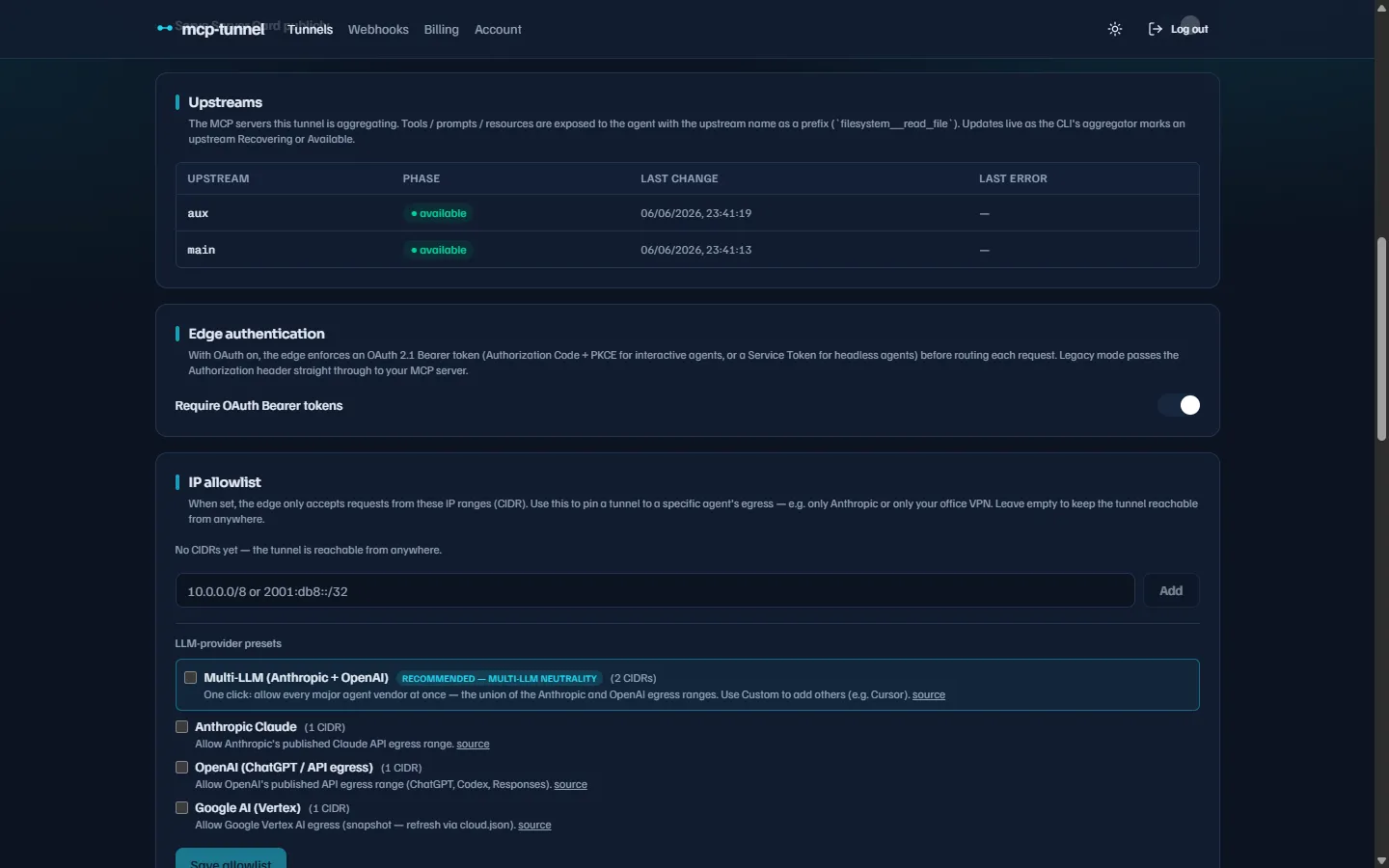 The Upstreams section in a tunnel’s Settings tab — one row per backend, with live phase badges.
The read surface is GET /api/tunnels/:id/upstreams for the current snapshot
and GET /api/tunnels/:id/upstreams/stream for the SSE live tail. Both are
owner-scoped and return an empty list for single-upstream tunnels.
Because tool names carry the <upstream>__<tool> prefix on the wire, the
Live tab and Inspector let you filter traffic by
upstream, and the Tools tab groups per-tool stats and
pins by their originating upstream.
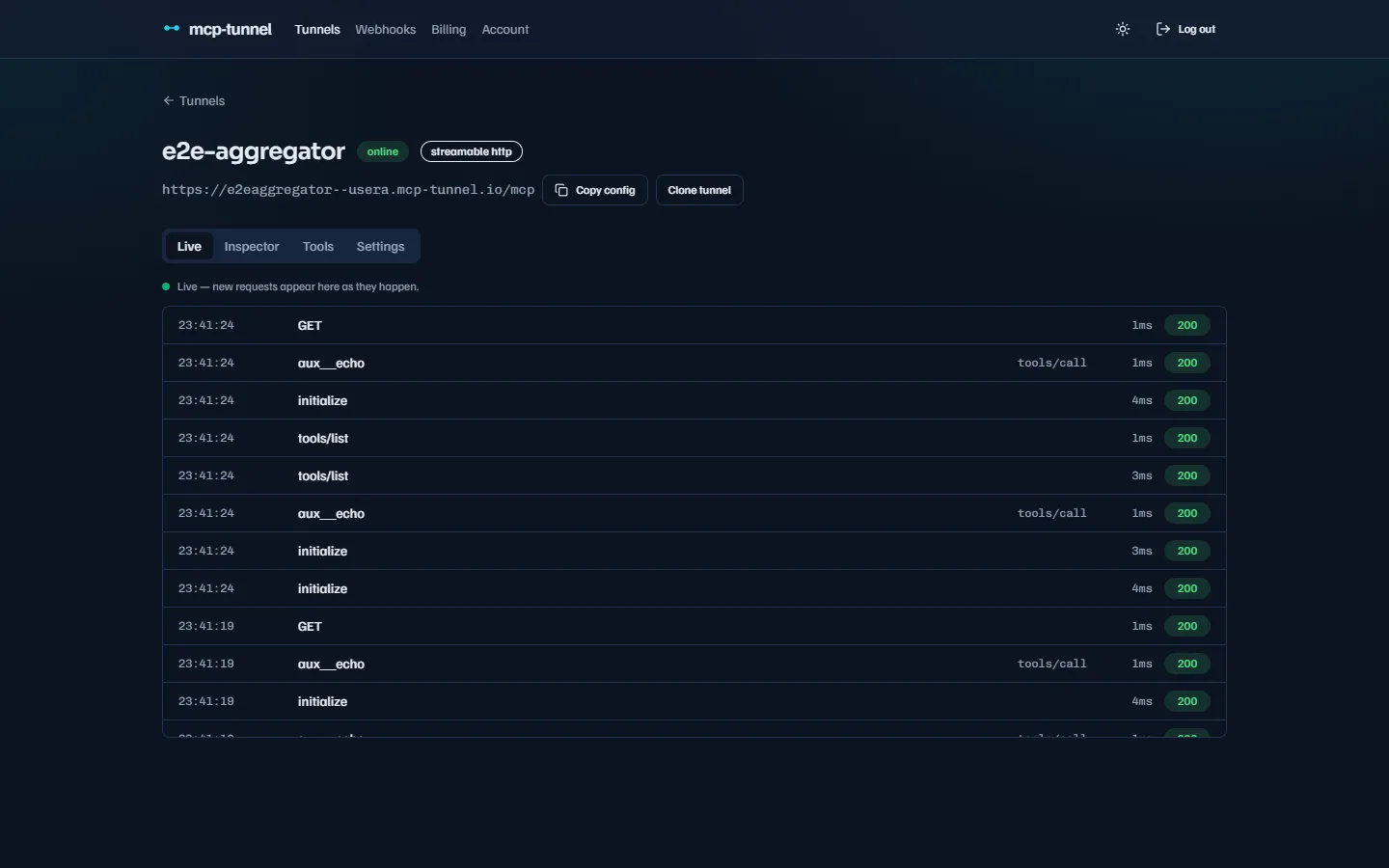 Aggregated calls appear with their
 upstream__tool names, so you can tell at a glance which backend served each request.
Notes and gotchas
Section titled “Notes and gotchas”- The public URL is unchanged by aggregation: agents still connect to
https://<subdomain>--<account-slug>.<zone>/mcpover Streamable HTTP. - Governance applies across the merged surface: a tool policy
or rate limit targets the prefixed name
(
filesystem__read_file), and auth and IP allowlists are enforced once by mcppipe, in front of all upstreams. - Zero-knowledge mode routes raw bytes and disables JSON-RPC parsing, so it cannot prefix or fan out — it is not compatible with the aggregator. Use it on a single-upstream tunnel.
Related
Section titled “Related”- Reliability: reconnect & sessions — how sessions survive reconnects across a multi-upstream tunnel.
- CLI reference — every
upflag and the--upstreams-fileschema.