Tool governance
mcppipe sees every JSON-RPC request before it reaches your upstream, so it can govern what runs and how often — without you touching the MCP server. All controls in this guide are per-tunnel and live under the tunnel’s Settings and Tools tabs in the dashboard.
Governance is available on every plan. It only applies to tunnels in the default capture mode — a zero-knowledge tunnel routes raw bytes, so mcppipe never parses traffic and tool policy, rate limits, and pinning are all inactive there.
Tool policy (allow / deny)
Section titled “Tool policy (allow / deny)”A tunnel’s tool policy decides which tools/call requests mcppipe forwards.
Set it under Settings → Tool policy. There are three modes:
| Mode | Behaviour |
|---|---|
| Allow every tool | Forward every tools/call. The default — no enforcement. |
| Allow only the listed tools | Forward a tools/call only when its tool name is in the list; deny the rest. |
| Deny the listed tools | Deny a tools/call whose tool name is in the list; forward the rest. |
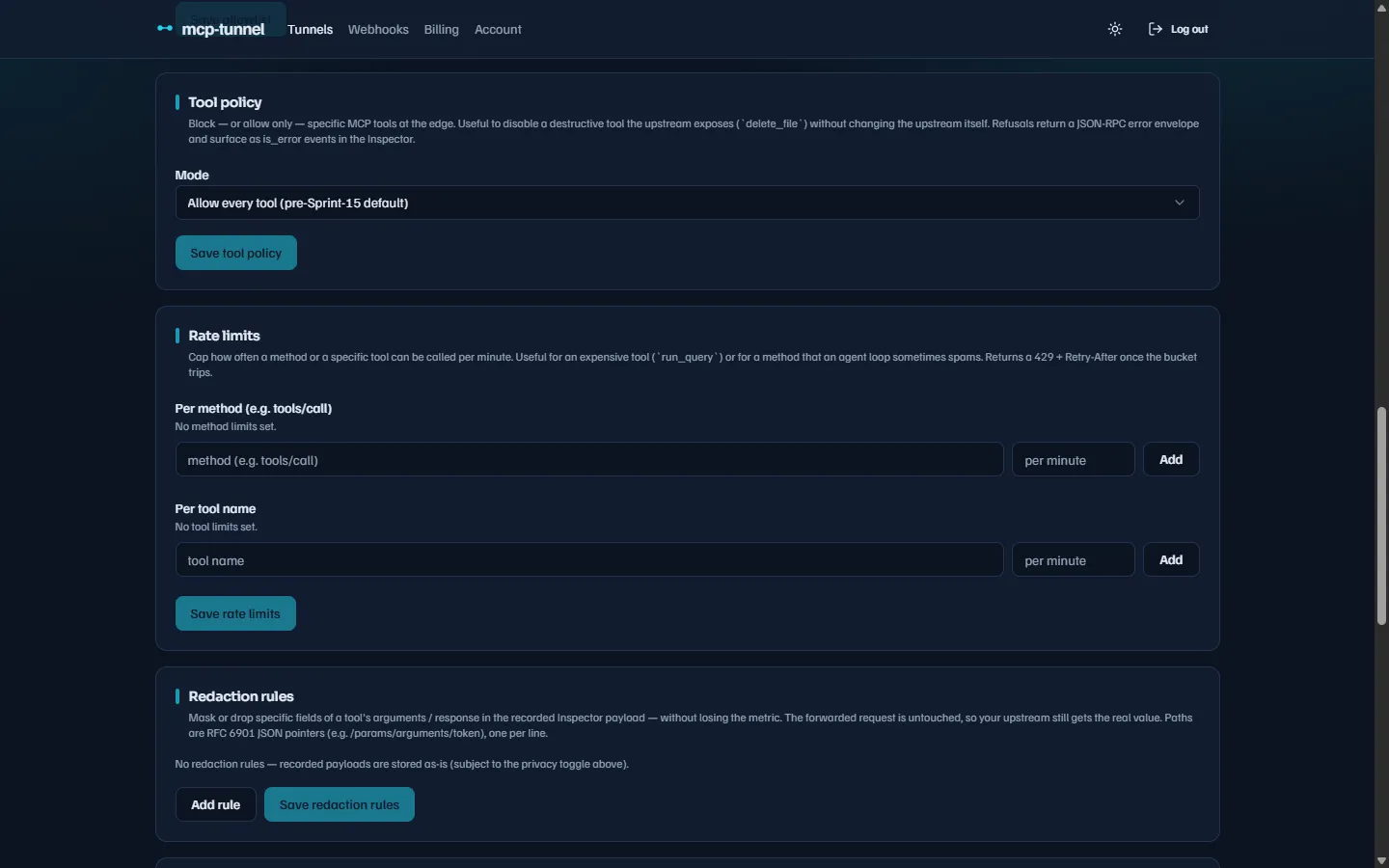 Choosing a mode and managing the tool list under Settings → Tool policy.
Policy applies only to tools/call. Other methods (tools/list,
prompts/get, …) are always forwarded — the policy models tool-level
governance, not method-level. A tools/call with no params.name is also
forwarded, so the upstream produces its own error rather than mcppipe
pre-empting it.
The list is capped at 32 tool names. Names are trimmed, sorted, and deduplicated when you save.
What a denied call returns
Section titled “What a denied call returns”A blocked tools/call gets HTTP 403 and a JSON-RPC error envelope. The
envelope mirrors the shape used for upstream errors, so an agent’s existing
error handler needs no extra parsing:
{ "jsonrpc": "2.0", "id": 42, "error": { "code": -32000, "message": "Tool denied by tunnel policy", "data": { "policy_code": "tool_denied", "http_status": 403, "tool": "delete_file" } }}The response also carries an x-mcppipe-error: tool_denied header, and the
refusal is recorded as an is_error event so it appears in the
Inspector next to the original request.
Rate limits
Section titled “Rate limits”Rate limits cap how often a method or a specific tool can be called per
minute. Configure them under Settings → Rate limits as two tables of
(name, per_minute) rows — one keyed by JSON-RPC method, one keyed by tool
name.
Method-scoped and tool-scoped limits, each a per-minute cap.
mcppipe enforces an approximate sliding window (current + previous minute
buckets) that avoids the burst a fixed bucket would allow at a minute boundary. On a tools/call, the method rule and the tool rule are
both evaluated — both must pass, and whichever bucket trips first refuses
the request. A per_minute of 0 disables a rule; each map is capped at 32
entries.
What a rate-limited call returns
Section titled “What a rate-limited call returns”An over-limit request gets HTTP 429 plus a Retry-After header (seconds
until the next minute boundary, clamped to 1–60) and a JSON-RPC envelope:
{ "jsonrpc": "2.0", "id": 7, "error": { "code": -32000, "message": "Rate limit reached for this tunnel", "data": { "policy_code": "rate_limited", "http_status": 429, "retry_after_seconds": 17, "limit_scope": "tool", "limit_name": "run_query" } }}limit_scope is method or tool, and limit_name tells you which rule
tripped. As with denials, the x-mcppipe-error header is set and the event
is recorded for the Inspector.
Tool stats (Tools tab)
Section titled “Tool stats (Tools tab)”The Tools tab shows per-tool, per-method aggregates over the last 24 hours
of recorded events: call count, error count, error rate, average latency, p95
latency, and the last-call timestamp. For an aggregator
tunnel, the upstream prefix (<upstream>__tool) is split into its own column.
The table auto-refreshes every 30 seconds, so you can watch a live debug
session without reloading.
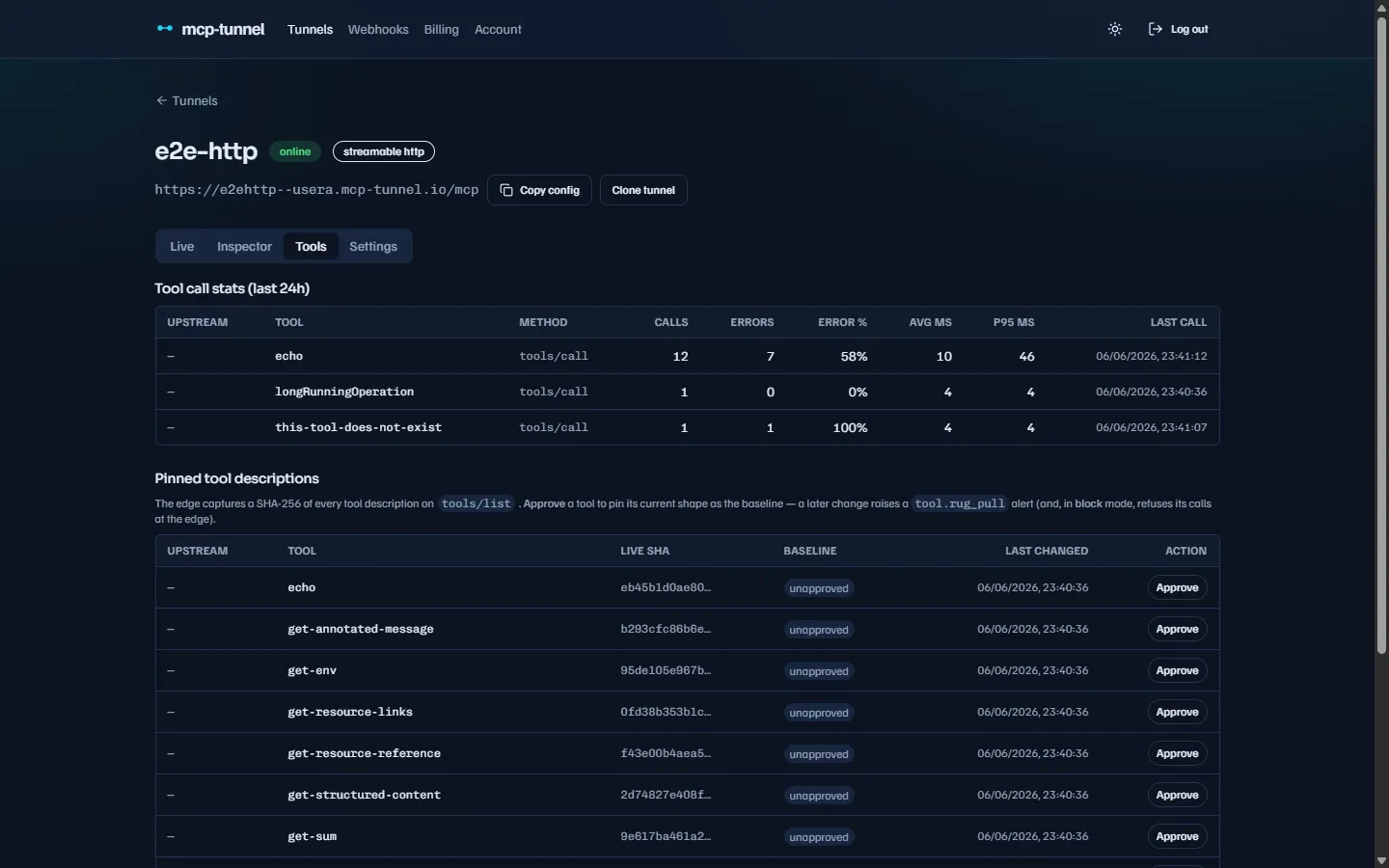 Per-(tool, method) calls, error rate, and p95 latency over the last 24 hours.
Stats are computed from the same recorded event stream the Inspector reads. The
window can be widened via the hours query parameter (1–168) backing the table.
Tool pinning & rug-pull detection
Section titled “Tool pinning & rug-pull detection”A malicious or compromised MCP server can quietly change a tool’s description
or input schema after you have approved it — a “rug-pull.” mcppipe detects
this by pinning a SHA-256 of each tool descriptor (name + description +
inputSchema, canonicalised so key reordering does not count as a change).
Every tools/list response that flows through mcppipe is hashed and compared
to the stored pinset. The descriptor key order is normalised before hashing,
so an upstream that merely re-serializes its JSON is not flagged.
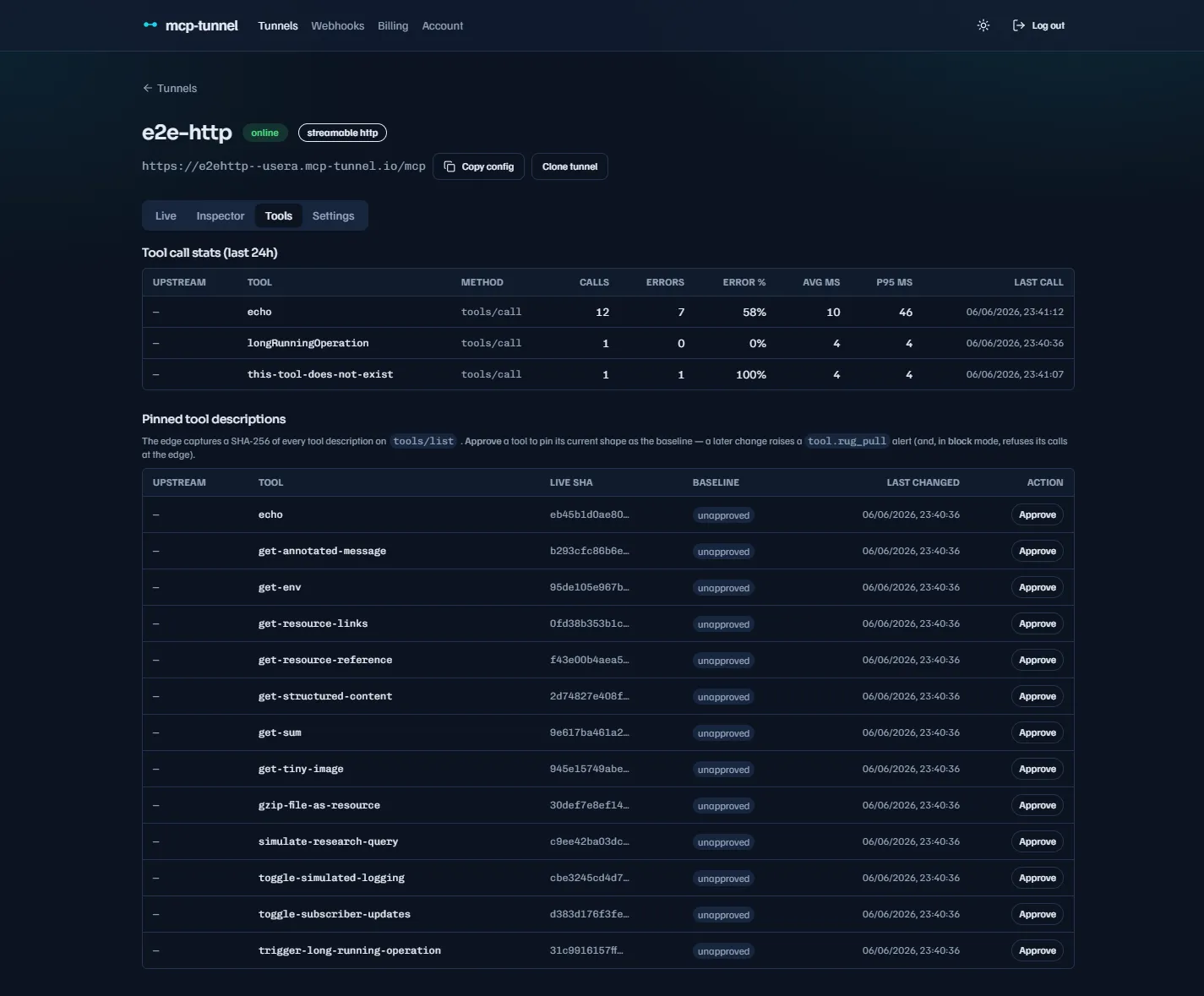 Each pin shows its description SHA and a status: unapproved, approved, or RUG-PULL.
Approving a baseline
Section titled “Approving a baseline”In the Tools tab, each pin shows a status:
- unapproved — mcppipe has seen the tool but you have not blessed a baseline yet.
- approved — the live description matches your approved baseline.
- RUG-PULL — the live description differs from the approved baseline.
Click Approve to stamp the tool’s current shape as the baseline (this
calls POST /api/tunnels/:id/tool-pins/:tool/approve). From then on, any
tools/list whose descriptor differs from that baseline is a drift.
Detection vs. enforcement
Section titled “Detection vs. enforcement”Drift is always detected and emitted as lifecycle events:
- A change against the last-seen pin fires
tool.changed. - A change against the owner-approved baseline fires
tool.rug_pull.
Both are delivered to any matching webhooks. What happens to the agent’s calls is controlled by the Rug-pull protection toggle under Settings:
| Mode | Behaviour |
|---|---|
| warn (default) | Drift raises tool.rug_pull only. Calls are still forwarded. |
| block | Drift additionally refuses tools/call for the drifted tool before it reaches your server. |
In block mode, a tools/call for a drifted tool gets HTTP 403:
{ "jsonrpc": "2.0", "id": 9, "error": { "code": -32000, "message": "Tool blocked: changed from approved baseline (rug-pull)", "data": { "policy_code": "tool_pin_violation", "http_status": 403, "tool": "transfer_funds" } }}Re-approving the tool’s new shape clears the block immediately. If the
upstream reverts a tool to its approved shape, the block self-heals on the
next tools/list.
See it in the Inspector
Section titled “See it in the Inspector”Every governance refusal — denied tool, rate limit, or pin violation — is
recorded as an error event with its policy_code in the payload, so you can
trace exactly which control fired and why.
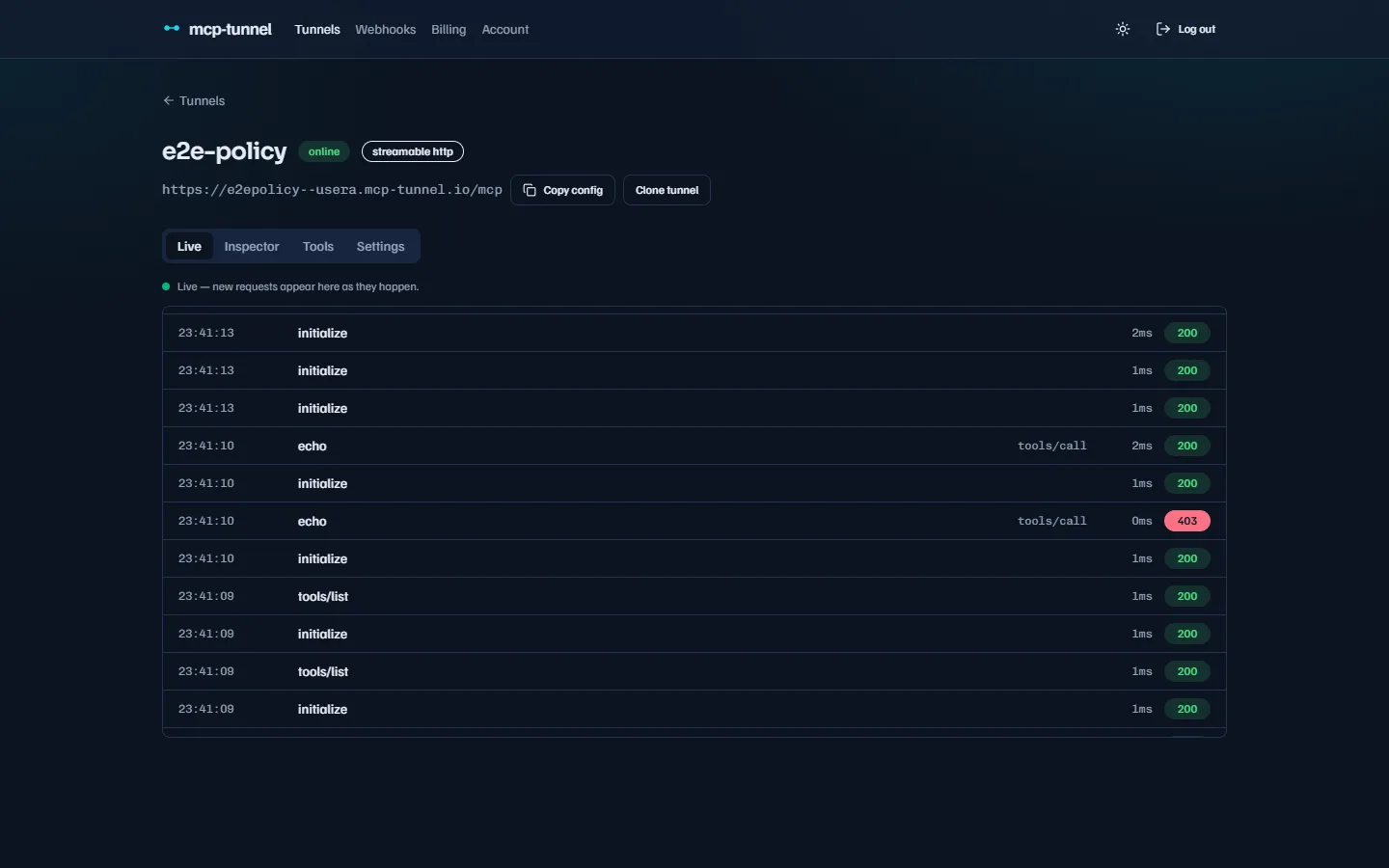 A policy refusal recorded alongside the original request in live traffic.
Related
Section titled “Related”- Live traffic & Inspector — watch and replay calls.
- Webhooks — receive
tool.changedandtool.rug_pull. - Privacy: redaction & zero-knowledge — note that governance is off on zero-knowledge tunnels.
- Authentication: OAuth & Service Tokens and IP allowlist & access control — who can reach the tunnel at all.
- Dashboard reference — every tunnel tab and setting.